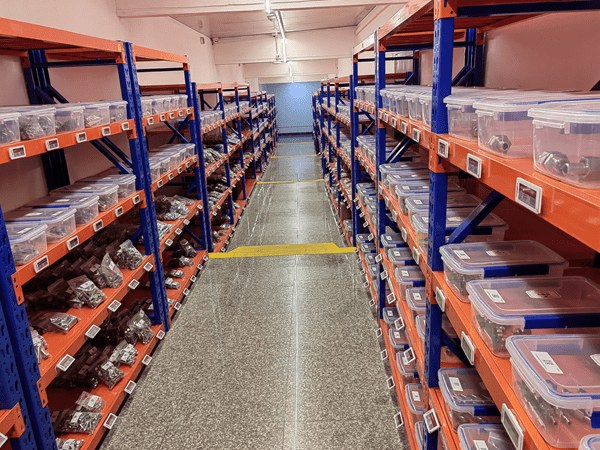
Labeling looks like a small detail until you trace where picking errors come from. A rack position with a faded, wrong or missing label sends an operator to the wrong bin, and every mispick costs money in returns, reshipping and lost trust. This guide covers each warehouse shelf label type, what it costs, and a checklist for choosing — including when it makes sense to move from printed labels to electronic shelf labels.
| Metric | Figure | Source |
|---|---|---|
| Picking error rate, manual/no-scan operations | approx. 1–3% of picks | NetSuite |
| Average cost per mispick | approx. USD 22–41 (estimates vary by industry) | DMSi |
| Picking accuracy expected as standard | at least 99.5% | Extensiv |
What Are Warehouse Shelf Labels?
What does a warehouse shelf label actually identify?
A warehouse shelf label identifies either a location (aisle, bay, level, position) or the product stored there (SKU, description, quantity, barcode) — and in most operations it does both. Location labels give the warehouse a fixed address system that the WMS can direct pickers to; product labels confirm the operator has reached the right item. When both are present and accurate, scan-verified picking becomes possible, which is the single biggest lever for accuracy.
Shelf labels sit alongside other warehouse labels — pallet labels, LPN (license plate number) labels, floor and dock signs, and hanging warehouse signs. This guide focuses on the shelf, rack and bin layer, because that is where labels are densest and where re-labeling labor concentrates.
5 Types of Warehouse Shelf Labels
Most operations use a mix of five label types, chosen by how often the position changes and the environment it lives in.
| Type | How it attaches | Best for | Trade-off |
|---|---|---|---|
| Adhesive barcode labels | Permanent or removable adhesive on the rack beam or shelf edge. | Fixed layouts that rarely change; lowest cost per position. | Re-slotting means scraping and reprinting; adhesives fail in freezers unless rated. |
| Magnetic labels | Magnetic backer grips steel racking and shelving. | Operations that re-slot seasonally; instant repositioning. | Higher cost per label; can be knocked off by impact; steel surfaces only. |
| Label holders + inserts | Plastic channel or clip holds a printed paper/card insert. | Frequent product changes with a stable location grid. | Inserts still need printing and swapping by hand; holders collect dust and damage. |
| Specialty: cold-storage & wire-rack | Freezer-grade adhesive, coated stock, or hanging/cable-tie mounts for wire shelving. | Freezers, chillers, wire racking, outdoor yards. | Higher unit cost; must be specified for the exact temperature and surface. |
| Electronic shelf labels (e-ink) | Clip-on rails or holders on rack edges and bins; updates wirelessly. | Positions where SKU, quantity or pick data changes often; pick-to-light workflows. | Highest upfront cost per position; needs gateways and software integration. |
Label categories per Camcode’s warehouse labeling overview and AiESL deployment experience.
Which label type works when slotting changes often?
If locations move, avoid permanent adhesive. Magnetic labels and label holders exist precisely so the label can move with the product. But note what actually changes: if the location grid is stable and only the product in each slot changes, the strongest options are holders with inserts (cheap, manual) or electronic labels (automatic). If the racking itself is reconfigured seasonally, magnetic labels are the pragmatic middle ground.
What about wire shelving and freezers?
Wire racking has no flat surface for adhesive, so use wrap-around tags, cable-tie holders or hanging placards. Subzero areas kill standard adhesives; cold-storage labels use freezer-grade adhesives and protective coatings, or magnet backers that do not care about temperature cycling. For electronic labels in chilled and frozen areas, ask for tested low-temperature battery data — our note on ESL battery life explains why temperature matters.
How Should You Code Warehouse Locations?
A label is only as good as the location code printed on it. Use a hierarchical scheme — zone, aisle, bay, level, position — kept consistent across the whole site. Practical rules that prevent most confusion:
- One address per pickable position, even for wide shelves — ambiguity is where errors start.
- Label at consistent height and orientation, so operators and scanners always know where to look.
- Use arrows or color bands for multi-level racking, so an upper-level label glued to a lower beam cannot be misread.
- Put the barcode and the human-readable code on every label — scanners fail, people improvise.
- Number aisles with room to grow (A01, A02 …) so an expansion does not force a full re-label.
See also Camcode’s step-by-step rack labeling guide.
Electronic Shelf Labels in the Warehouse
What do electronic warehouse shelf labels do differently?
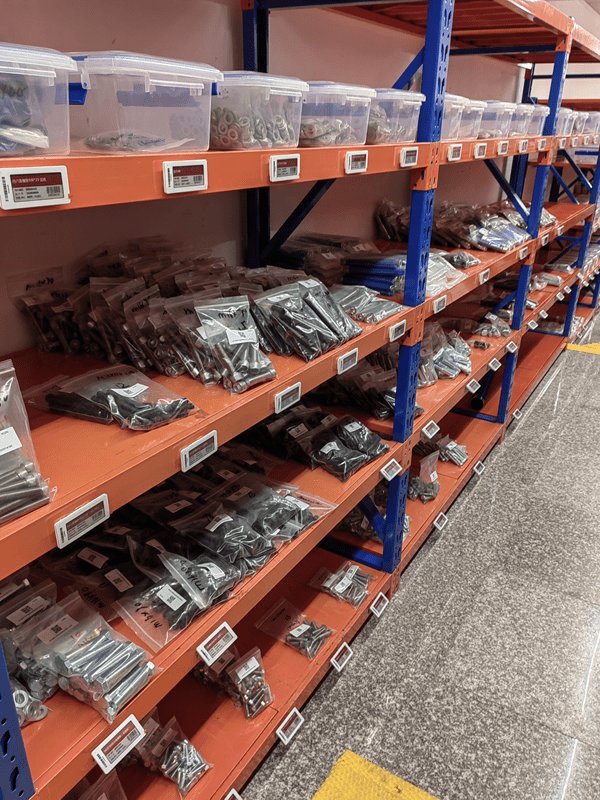
An electronic shelf label replaces the printed insert with a battery-powered e-ink display that updates from your WMS, ERP or inventory software over a wireless gateway. The label shows whatever the system knows — SKU, description, location code, on-hand quantity, batch or pick data — and redraws automatically when stock moves. Because e-paper only draws power when the image changes, tags run for years on one battery. The result: no printing, no walking the aisles to swap inserts, and no drift between what the system says and what the shelf says.
How does pick-to-light work with ESL bin labels?
Warehouse ESL models add an LED indicator to the display. When an order drops, the system flashes the LED on every bin in the pick path — the operator follows the lights instead of reading location codes, and can confirm the pick with a button press on some models. This cuts search time and is the reason warehouse operators often see faster payback on ESLs than retail stores do: the labels participate in the workflow rather than just describing it. Our warehouse & DC solution covers the pick-to-light configuration in detail.
Which ESL sizes fit racks and bins?
Small parts bins typically take 1.54″–2.9″ monochrome tags; rack beams and bulk locations use 4.2″ and larger displays readable from a forklift. Warehouses almost always choose monochrome e-paper — contrast and viewing distance matter more than color. For the full size and network breakdown, see types of electronic shelf labels, or compare AiESL label models.
External reference: E Ink — electronic shelf label applications.
Electronic Labels for Workshop Parts Bins and Inventory
Can electronic shelf labels manage parts bins in a workshop or MRO store?
Yes. In a workshop, maintenance store or spare-parts room, a small e-ink label on each parts bin shows the part number, description and live on-hand quantity from your inventory or CMMS system, and updates itself when stock is issued, received or re-slotted. That solves the three usual problems of paper bin labels in these environments: labels that no longer match the bin after parts are moved, quantities that are only known after a manual count, and technicians who cannot find a part quickly when a machine is down.
| Workshop need | What the electronic bin label does | Typical setup |
|---|---|---|
| Find the right part fast | The LED on the bin flashes when a technician searches or a work order is released (pick-to-light). | LED-equipped 1.54″–2.9″ tags on small-parts bins. |
| Know stock without counting | Shows on-hand quantity from the inventory system and redraws after each issue or receipt. | Integration via API, MQTT or database sync. |
| Re-slot without re-printing | Re-assign a bin in software and the label updates; no new inserts to print and fit. | Tags bound to location codes, not to fixed printed text. |
| Trigger reorders | Low-stock status can be shown on the label and passed back to purchasing. | Min/max thresholds held in the inventory system. |
| Harsh conditions | E-paper stays readable without power; choose housings rated for dust, oil or cold rooms. | Check the tag’s IP rating and temperature range before buying. |
The same approach works for parts counters in automotive and equipment dealerships, tool cribs and electronics component stores. Connection options are covered in ESL integration with POS, ERP, API and MQTT, and the pick-to-light configuration on our warehouse & DC solution page.
Do Better Shelf Labels Actually Improve Picking Accuracy?
Yes — labeling is a precondition for scan-verified picking, and scan verification is what moves accuracy from the 97–99% range toward 99.5% and above. Warehouses running manual, paper-driven picks commonly sit at 1–3% error rates; each of those errors carries not just the direct handling cost (commonly estimated at $22–$41, and much more in some industries) but also returns, refunds and customer churn. Barcode-verified workflows attack the error at its source: the operator cannot confirm a pick from the wrong location.
Electronic labels push one step further by removing stale data, the failure mode scanning cannot catch. If a printed insert says a SKU lives in a bin it left last week, the scan will fail only after the walk. An ESL that re-draws when the WMS reassigns the slot means the shelf never disagrees with the system. For the cost mechanics of replacing printed labels, our ESL vs paper labels comparison runs the numbers over five years.
How Much Do Warehouse Shelf Labels Cost?
What should you budget per storage position?
Printed labels are cheap per unit but carry recurring printing and labor costs; electronic labels cost more upfront and near-zero to maintain. Typical structure:
| Label type | Hardware cost pattern | Recurring cost |
|---|---|---|
| Adhesive barcode labels | Lowest; quoted per roll or per thousand, by material and volume. | Reprinting, scraping and re-applying at every slotting change. |
| Magnetic labels | Higher per position; quoted by size and laminate. | Low — reusable, but inserts/prints still updated by hand. |
| Label holders + inserts | Holder is a one-time cost per position. | Paper, printing and walking time for every insert swap. |
| Electronic shelf labels | Approx. $5–$20 per tag by size and volume, plus gateways and software. | Minimal — battery replacement after multi-year service life. |
ESL price range: AiESL pricing guide; see how much electronic shelf labels cost for a full breakdown. Printed-label pricing is volume-quoted — request quotes for your position count.
The honest comparison is per position per year, not per label. A holder plus four insert changes a year costs little in materials but real money in labor across ten thousand positions. An ESL fleet inverts that: the cost is upfront hardware, and the update cost of the ten-thousandth price or slot change is effectively zero.
How to Choose Warehouse Shelf Labels: A 6-Point Checklist
- Map how often positions change. Static layout → adhesive. Product churn in fixed slots → holders or ESL. Seasonal re-racking → magnetic.
- Audit the environment. Freezer, chiller, outdoor yard and wire racking each need labels specified for the surface and temperature.
- Fix the location coding scheme first. No label type rescues an ambiguous address system.
- Count the true labor cost. Multiply insert swaps and reprints per year by positions — this number usually decides the printed-vs-electronic question.
- If going electronic, check integration. The label is only as current as the WMS/ERP feed behind it; confirm connectors, update latency and gateway coverage for your building.
- Pilot one difficult zone. Run one aisle or bin wall for a month, measure mispicks and update success before scaling.
If your operation leans toward the electronic end, see how our customers run ESL in warehouses or compare label models against your rack and bin sizes.