This guide is written from the questions retailers actually ask us before and after buying — the ones that come up repeatedly across six years and hundreds of customers, in English, Russian and Chinese. They are not the questions keyword tools surface. They are the ones people ask once money is involved. For what the decision layer running on that server actually does, see what an AI ESL is. If you are still at the stage of working out what the hardware does, start with what electronic shelf labels are and come back to this once a supplier has sent you a quote.
We are a vendor, so read this with the appropriate scepticism. The most useful thing we can do is give you the questions to put to us as well as to everyone else, which is what the checklist at the end is for.
What are the real deployment options?
Three, and the middle one is where most confusion lives.
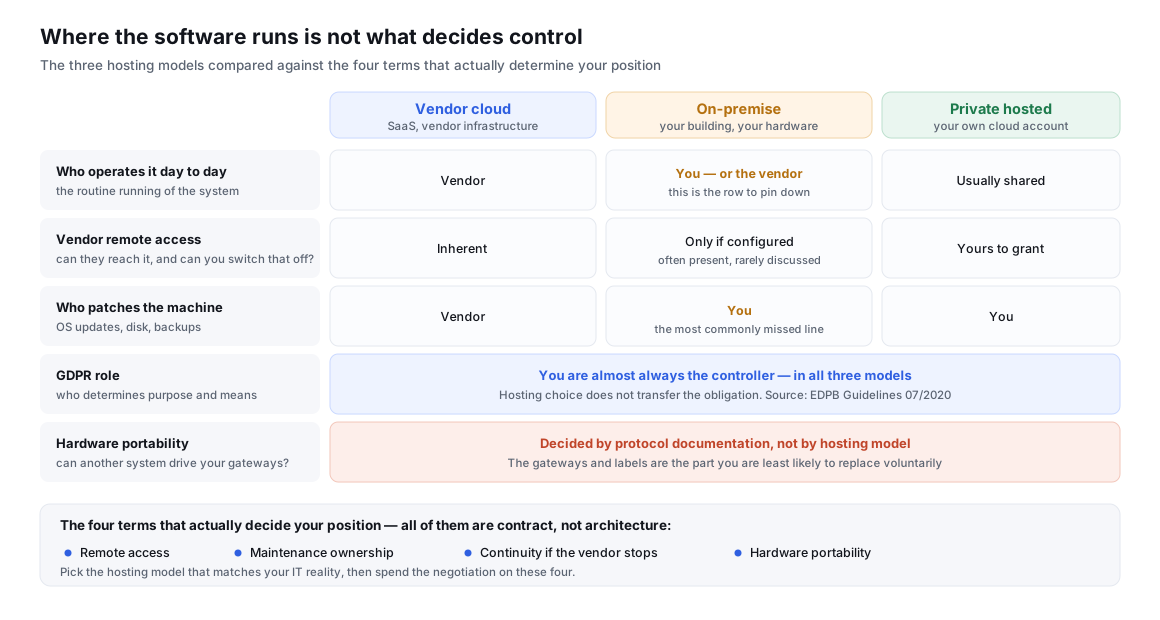
| Model | Where it runs | Who operates it day to day | Typically chosen when |
|---|---|---|---|
| Vendor cloud (SaaS) | Vendor’s infrastructure | Vendor | You have no IT team, want fastest start, and are comfortable with a recurring fee |
| On-premise | Your building, your hardware | You — or the vendor, remotely. This is the part to pin down | Policy, connectivity or data-residency rules require it |
| Private hosted | Your cloud tenancy (your account with a cloud provider) | Usually shared | You want the data in your own account without running physical hardware |
The middle row is where buyers get surprised. “On-premise” is often assumed to mean independence. In practice a great many on-premise installations still depend on the vendor for updates, licence renewal and remote troubleshooting. That is a perfectly workable arrangement — but it is hosting independence, not operational independence, and the difference only becomes visible when something goes wrong.
Do I need one server per store?
Almost never. The normal pattern is one system for the estate, not one per site.
This question comes up constantly from multi-store buyers, and it usually comes from a reasonable but mistaken mental model: that because each store has its own gateways and its own labels, it must also have its own server. It does not follow. Gateways are local because radio is local. The pricing system is not local, because prices are not decided store by store in most chains.
What actually varies by store is the network path, not the server count:
- One central system, stores connect to it. The usual arrangement. Each store’s gateways talk to a single instance over the network. Adding a store is a configuration change, not a new deployment.
- Local cache or edge node per store. Sometimes used where store connectivity is unreliable, so that a dropped link does not stop local updates. This is a resilience decision, not an architectural requirement.
- Genuinely separate systems per store. Occasionally required by franchise structures where each store is a separate legal entity with its own data. Expensive to run, and worth confirming you really need it.
If a supplier proposes one server per store for a chain without explaining which of these applies, ask why. It multiplies both your hardware cost and your maintenance burden, and it is the kind of decision that is hard to unwind two years later.
The related question — can several stores be joined into one network later? — is worth asking before you buy the first store’s worth of equipment, not after. Merging separately deployed systems is considerably harder than adding a store to a system that was designed for several.
What does the cost actually consist of?
Five components. Confusion almost always comes from a quote that bundles some of them and stays silent on the rest. We are not going to publish our own numbers here, because the useful thing is not our price — it is knowing what to make every supplier itemise, including us.
| Cost component | What it covers | What to ask |
|---|---|---|
| Software licence | The right to run the system. May be one-time, subscription, or one-time plus annual maintenance | Is it perpetual or term? Priced per store, per label, per user, or per estate? What happens at renewal if my label count grows? |
| Deployment & implementation | Installing, configuring, connecting to your POS or ERP, importing product data, testing | One-off or recurring? What exactly is included — and what is billed as extra once we start? |
| Server hardware | Only applies on-premise. A machine, or capacity in your own cloud account | What specification do you actually require? Do I buy it, or do you supply it — and does that change the software price? |
| Annual maintenance & updates | Bug fixes, security patches, new versions, compatibility with future label models | Is it optional? What stops working if I do not renew — updates only, or the system itself? |
| Remote support | Someone available when a gateway drops or an integration breaks | Included or billed? What response time, in which time zone, in which language? |
Two of these cause most of the disputes we see, and both are avoidable.
The first is the boundary of “deployment”. A deployment fee that covers installing the software is a different thing from one that covers connecting it to your ERP, mapping your product fields, and getting your first store live. Both are legitimate scopes. Trouble starts when the buyer assumed the second and the quote covered the first. Ask for the deliverable, not the activity: at the end of this fee, what specifically is working?
The second is what the annual fee is actually buying. There is a large practical difference between an annual fee that buys updates — where the system keeps running if you stop paying, just frozen — and one that buys the right to run at all. Neither is wrong. But you should know which you signed, because it determines whether your renewal conversation is a negotiation or an ultimatum.
For the hardware side of the budget — labels, gateways and installation — see our ESL cost breakdown. That article deliberately does not cover the software line, which is what this one is for. Both feed the same business case — our guide to calculating ESL ROI shows where software and deployment sit in the payback arithmetic, and why leaving them out is the most common way a case gets overstated.
Who maintains the server after handover?
Ask this before installation, and get the answer in the contract rather than in an email. It is one of the most common post-purchase questions we receive and one of the least commonly documented at the point of sale.
In a vendor cloud deployment the answer is straightforward: the vendor does, and their uptime is your uptime. On-premise is where it gets vague, because three different jobs get bundled under the word “maintenance” and different parties may own each:
- The machine — operating system patches, disk space, backups, physical failure. Usually yours, and frequently nobody realises this until a disk fills up.
- The application — the ESL software itself, its updates and fixes. Usually the vendor’s, under the annual fee.
- The integration — the link to your POS or ERP, which breaks when either side changes. Genuinely shared, and worth naming an owner for. Our integration guide covers what that link involves.
Write down which party owns each of the three, and what the path is when something fails outside business hours in your time zone. A support arrangement that exists only during the vendor’s working day is not necessarily a problem — but it is a very different proposition for a store that re-prices at six in the morning.
What if the people who built it move on, or the vendor disappears?
This is a legitimate question, it is asked more often than vendors admit, and there is a standard commercial answer to it.
The concern is sharper for on-premise than for cloud, because an on-premise system that nobody can maintain keeps running until the day it does not — and by then the people who understood it are gone. It is sharpest of all in this category, because a shelf-label system is not a standalone tool: it sits between your pricing system and thousands of pieces of hardware you have already paid for.
The established mechanism is a software escrow agreement — a three-party arrangement between you, the vendor and a neutral escrow agent. The vendor deposits source code and build documentation with the agent, who releases it to you only if a defined trigger occurs, typically the vendor ceasing trading, entering insolvency, or failing to provide the maintenance it contracted to provide. It is a well-established instrument, not an exotic ask, and it exists precisely because this risk is real.
Escrow is not free and is not always proportionate. For a two-store pilot it is overkill. For a chain putting its shelf-edge pricing on one system for the next decade, it is a reasonable line item. Between those poles there are lighter measures worth asking for:
- Documented export. Can you get your product data, templates and label-to-product mappings out, in a documented format, without vendor assistance? Test this during the pilot rather than assuming it.
- Documented interfaces. If the integration is built on published, standard interfaces rather than an undocumented private protocol, a successor can rebuild the link. This is one of the practical arguments in open versus closed ESL systems.
- Named continuity terms. What notice period applies if the vendor discontinues the product? What happens to your licence?
A vendor who reacts badly to being asked about continuity has told you something useful.
If it runs on my server, can you still change it remotely — or switch me off?
The honest answer is that it depends entirely on what the contract and the technical setup allow, and buyers are entitled to have both stated explicitly.
Technically, remote access to an on-premise system exists if it is configured to exist. Most vendors want some form of it, for a defensible reason: remote support is far faster than shipping an engineer, and updates have to reach the system somehow. The problem is not that remote access exists — it is that it is often never discussed, so the buyer discovers the arrangement only when they start wondering about it.
Four things worth settling in writing:
- Does the vendor retain remote access by default, and can it be turned off? A common middle ground is access that you enable per support session rather than standing access.
- Is there a licence check that requires contacting the vendor? If yes, what happens if that check cannot complete — does the system degrade, or stop? This is the mechanism behind the “can you switch me off” question, and it deserves a plain answer.
- Who can see the data, and is that access logged? A support engineer able to open your pricing data is normal. Not being able to tell afterwards whether they did is not.
- What survives non-renewal? Covered above, and it belongs in the same clause.
On data protection there is a point that is widely misunderstood. Choosing on-premise does not move your legal obligations somewhere else. Under the GDPR framework, the party that determines the purposes and means of processing is the controller, and for a retailer running its own pricing and shelf operations that is almost always the retailer — whether the software sits in its building or in a vendor’s cloud. A vendor operating the system on your instructions is generally a processor. The EDPB guidelines on these concepts set out how the roles are determined; the practical consequence is that self-hosting is a control and continuity decision, not a way to hand your compliance duties to a supplier.
This matters more than usual for shelf labels because most ESL deployments hold very little personal data — products, prices and templates, not shoppers. If a supplier presents on-premise primarily as a privacy necessity for this category, ask which personal data they mean. Usually the honest reason for on-premise is control, continuity or connectivity, and those reasons are good enough on their own.
Will my existing base stations and labels work with a new server?
This is the question that decides how expensive your next decision is, and it is usually asked too late.
Software gets replaced. Hardware does not, or not cheaply — you may have thousands of labels and dozens of gateways already installed, mounted and commissioned. So the real question behind “cloud or my own server?” is often “if I change my mind in three years, what do I have to throw away?”
Three separate compatibility questions, and they have different answers:
| Change | Usual difficulty | What to establish up front |
|---|---|---|
| Same vendor, cloud ↔ on-premise | Normally supported | Confirm it is possible in both directions, and what it costs. Many buyers start in the cloud and move later |
| Same vendor, older gateways with a newer server version | Usually yes, within a support window | How long are existing gateway and label models supported? What is the notice period before a model is dropped? |
| Different vendor, existing hardware | The hard one. Depends entirely on whether the hardware speaks a documented protocol | Ask now, in writing, whether the labels and gateways can be driven by anything other than this vendor’s software |
The third row is the one that turns a software decision into a decade-long commitment. It is also why gateway capacity and coverage planning — covered in how many labels one gateway can support — is worth getting right early: the gateways are the part you are least likely to replace voluntarily.
How to decide
Most buyers do not need a complex framework. Four factors settle it:
| If this is true of you | Lean toward | Because |
|---|---|---|
| No internal IT team, few stores, want to start quickly | Vendor cloud | You are buying an operated service. Running a server you cannot maintain is the worse risk |
| Policy or contract requires data in your infrastructure | On-premise or your own cloud tenancy | The requirement decides it — but settle remote access and maintenance ownership explicitly |
| Unreliable store connectivity | Local resilience, whichever model | This is an availability problem, not a hosting problem. Ask what happens during an outage |
| Large estate, long horizon, hardware you intend to keep | Either — but negotiate continuity | Escrow, export and protocol documentation matter more than hosting location |
Questions to put to any supplier, including us
- Is the licence perpetual or term, and what specifically stops working if I do not renew?
- At the end of the deployment fee, what exactly is working — software installed, or first store live and integrated?
- For an on-premise install: who patches the operating system, who backs it up, and who owns the integration when it breaks?
- Do you retain remote access by default? Can I disable it? Is your access to my data logged and visible to me?
- Will you agree to a software escrow arrangement, and on what triggers?
- Can I export my product data, templates and label mappings in a documented format without your help? May I test that during the pilot?
- How long will you support the gateway and label models I am buying today, and what notice will I get before support ends?
- Can these labels and gateways be driven by any software other than yours?
The last two are the ones to press hardest. Everything else can be renegotiated at renewal; the hardware in your ceilings and on your shelves cannot.
Sources & method
- EDPB Guidelines 07/2020 on the concepts of controller and processor in the GDPR — European Data Protection Board, final version. How controller and processor roles are determined, and why hosting location does not by itself transfer them.
- Software escrow agreements — Escode (NCC Group). How the three-party deposit and release mechanism works in practice.
- Source Code Escrow Agreements Are Reaching For The Cloud — Lowenstein Sandler LLP. Why traditional escrow terms need adapting for hosted software.
- Demand evidence. The questions this article is built around come from our own record of customer conversations — roughly 6,600 questions asked by around 836 customers between 2020 and 2026, in English, Russian and Chinese. Software deployment and cost was the single most-asked topic and the most active in the last twelve months. Questions have been rephrased into general form; no customer, conversation or commercial term is reproduced.